
Counter
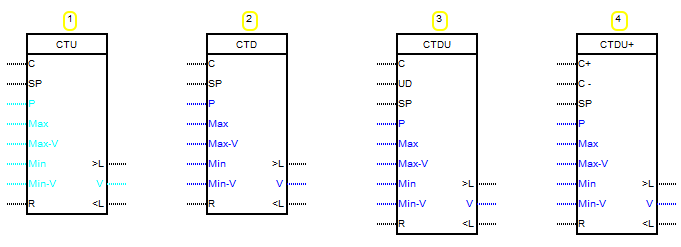
The counter is of four types:
1. Counter on increase. When the rising edge of the pulse, the counter value is increased by 1.
2. The counter to reduce. When the rising edge of the pulse, the counter value decreases by 1.
3. Counter to increase or decrease. The direction of the account depends on the presence of the signal at the input "UD".
In the presence of log. 1 the counter counts to increase, in the absence of the counter is to reduce.
4. Counter to increase or decrease with two account inputs.
On the leading edge of the pulse at the input “C+” to the content of the counter is added 1.
On the leading edge of the pulse at the input "C -" from the contents of the counter is subtracted 1.
The block is configured using the block editor
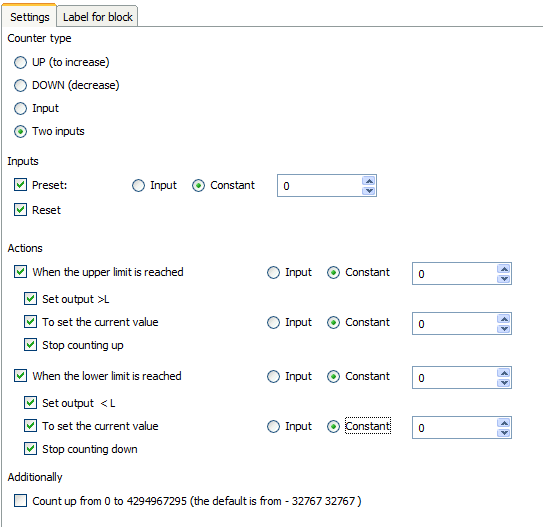
Counter type
Use this switch to select one of the above counter operation types
Inputs
Preset:
If you select this check box appears at the block input “SP”. At a high logical level, the value of the constant or read from the input “P”is written to the current value of the counter at this input.
Reset
When this checkbox is set, the “R " input appears on the block. At a high logical level, 0 is written to the current counter value at this input.
Actions
For the counter, it is possible to set two events-reaching the upper and lower limits.
The value of these boundaries can be set as a constant or read from the corresponding input.
For the upper limit, this will be the “Max” input for the lower “Min”.
When each event occurs, you can assign the following actions:
When each event occurs, you can assign the following actions:
Set output (“>L” or “<L”)
When installing these checkboxes, the blog will have “>” and“<L” outputs for the upper and lower borders, respectively.
If an event occurs, the corresponding output will be set to a high logical level.
To set the current value
When you set the checkbox data at the time of the corresponding event, the value of the constant or read from the corresponding input is written to the current value of the counter.
These are “Max-V” and ”Min-V” inputs for upper and lower limit respectively
These are “Max-V” and ”Min-V” inputs for upper and lower limit respectively
Stop counting up / Stop counting down
If you set these checkboxes at the time of the corresponding event, further work of the counter in the appropriate direction will be stopped
Additionally
Count up from 0 to 4294967295 (the default is from - 32767 32767 )
When you set this checkbox, the content type of the counter will be changed to Unsigned long and the account will be produced according to the limits of this type.