
Branch "The group of package blocks"
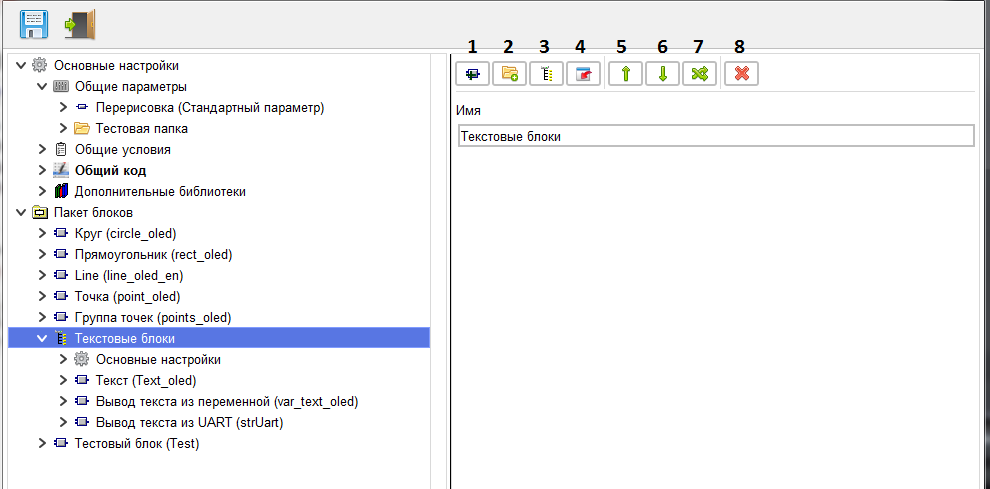
This branch is used for logical grouping of blocks included in the package. For blocks included in the package, you can create separate common parsmeters, common code, and General conditions
that will apply to all blocks included in the group.
The name of the group is set on this branch.
When you click the "New block" button»(1) a new block is created, and the transition to its main branch takes place.
When you click on the "New folder" button(2), a new folder is created, and you switch to its branch.
When you click on the "New group" button (3), a new group of blocks is created, and you go to the main branch of the created group.
When you click the "Export block or library" button (4), a window opens for selecting a block file or a block library. The block or library file selection field is loaded into the package.
The name of the group is set on this branch.
When you click the "New block" button»(1) a new block is created, and the transition to its main branch takes place.
When you click on the "New folder" button(2), a new folder is created, and you switch to its branch.
When you click on the "New group" button (3), a new group of blocks is created, and you go to the main branch of the created group.
When you click the "Export block or library" button (4), a window opens for selecting a block file or a block library. The block or library file selection field is loaded into the package.
Attention! Only blocks created in the old editor (Basic) are imported.
If the downloaded library contains blocks created in the Professional editor, they will not be imported, but will be skipped.
use the Up(5) and Down(6) buttons to move the group within the parent folder.
Using the "Free movement" button»(7) you can move the group to any location within the block package.
Using the "Delete group" button (8), you can delete a group, and its contents will be moved to the parent folder.
Using the "Free movement" button»(7) you can move the group to any location within the block package.
Using the "Delete group" button (8), you can delete a group, and its contents will be moved to the parent folder.